

How to Choose the Right PC Hardware for Modern Gaming
Modern gaming requires more than simply buying the most expensive computer components available. The right hardware combination delivers smoother performance, faster loading, better graphics, and greater longevity without unnecessary spending.
Understand Your Gaming Requirements
Before purchasing PC hardware, determine the types of games you normally play. Competitive titles, open-world adventures, simulation games, and demanding AAA releases can require very different performance levels.
Your preferred resolution also matters when selecting components. Gaming at 1080p generally requires less powerful hardware, while 1440p and 4K gaming demand significantly stronger graphics processing capabilities for consistently smooth gameplay.
Consider your target frame rate before building or upgrading your system. Players targeting 60 frames per second have different requirements from competitive gamers seeking 144Hz, 240Hz, or higher refresh rates.
Your budget should also influence every hardware decision. Instead of spending heavily on one component, create a balanced system where the processor, graphics card, memory, storage, cooling, and power supply work effectively together.
Choose the Right Gaming CPU
The CPU handles important calculations, game logic, artificial intelligence, physics, background processes, and communication between different hardware components. A capable processor helps prevent performance limitations during demanding gaming sessions.
Modern processors offer multiple cores and threads, making them suitable for gaming alongside streaming, recording, browsing, communication, and other applications. Choose a recent-generation CPU that matches your performance requirements.
Clock speed remains relevant, but it should not be considered independently. Architecture, cache, core performance, efficiency, and platform support can significantly influence real-world gaming performance across different titles.
Avoid purchasing an extremely powerful processor while pairing it with a weak graphics card. For most gaming systems, balanced component selection provides better overall performance than concentrating your entire budget on one part.
Select a Powerful Graphics Card
The graphics card is usually the most important component for gaming performance, particularly when playing modern AAA games at higher resolutions. It determines rendering capability, visual quality, and achievable frame rates.
When comparing GPUs, consider video memory, architecture, ray-tracing performance, upscaling support, power consumption, and expected performance at your chosen resolution. These factors help determine long-term suitability for modern gaming.
Gamers using 1080p displays may not need an extremely expensive GPU. However, 1440p gaming generally benefits from stronger graphics hardware, while demanding 4K gaming can require considerably more graphical processing capability.
Do not choose a graphics card based solely on memory capacity. A GPU with more VRAM is not automatically faster, because architecture, memory bandwidth, processing resources, software support, and thermal performance also matter.
Get Enough RAM for Modern Games
RAM provides temporary working space for games, operating systems, applications, and background processes. Insufficient memory can cause stuttering, slower multitasking, and frustrating performance problems during demanding gaming sessions.
For modern gaming computers, adequate memory capacity is important because newer games increasingly use larger amounts of system resources. Additional RAM can also help when running browsers, voice applications, launchers, and recording software.
Memory speed and compatibility should also be considered when selecting RAM. Check the motherboard and processor specifications to ensure your chosen memory operates correctly at supported speeds.
Using matched memory modules can help your system take advantage of dual-channel operation. A properly configured memory setup can provide better consistency and performance compared with poorly matched or incompatible modules.
Choose Fast and Reliable Storage
Storage affects game installation, operating system responsiveness, application loading, and file transfers. Solid-state drives are generally preferable for modern gaming because they provide substantially faster access speeds than traditional hard disk drives.
NVMe SSDs can provide excellent performance through modern PCIe interfaces. They are particularly useful for users who regularly install large games, transfer substantial files, or want fast overall system responsiveness.
Storage capacity is equally important because modern games can occupy significant amounts of space. A smaller drive may quickly become full, forcing you to uninstall games whenever new releases require additional storage.
Consider keeping your operating system and frequently played games on a fast SSD. Additional storage can be used for larger game libraries, recordings, documents, backups, and other files that require less frequent access.
Select a Suitable Motherboard
The motherboard connects your processor, graphics card, memory, storage, cooling system, and other components. Choosing the correct motherboard ensures compatibility and provides the features needed for your particular gaming setup.
Check the motherboard socket before purchasing a processor because different CPU generations use different platforms. Also verify memory support, expansion slots, storage connections, USB ports, networking, and other required features.
A more expensive motherboard does not automatically improve gaming performance. Premium boards often provide additional connectivity, stronger power delivery, better expansion options, and advanced features that may only benefit specific users.
Think about future upgrades when selecting your motherboard. A suitable platform can make it easier to add additional storage, memory, networking equipment, or other compatible hardware without replacing the entire computer.
Pay Attention to Cooling and Power
Gaming hardware generates considerable heat, especially during long sessions and demanding workloads. Effective cooling helps maintain stable performance and prevents excessive temperatures from causing thermal throttling or reduced component longevity.
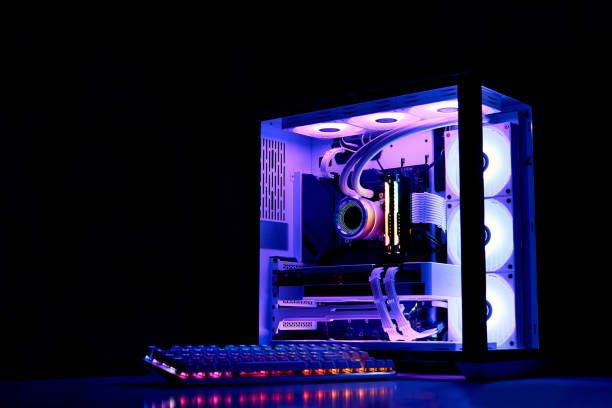
Your cooling solution should match your processor and overall system requirements. Air coolers can provide excellent value, while liquid cooling may appeal to users seeking specific performance, noise, or aesthetic characteristics.
The power supply is another critical component that should never be overlooked. Select a reliable unit with sufficient wattage and appropriate efficiency to safely support your processor, graphics card, storage, and accessories.
Avoid choosing an inexpensive power supply simply because it saves money. A high-quality power supply from a reputable manufacturer can provide stable power delivery and important protection for expensive computer components.
Consider Your Gaming Monitor
Your monitor determines how much of your hardware performance you can actually experience. A powerful graphics card paired with a basic display may prevent you from taking full advantage of available frame rates.
Resolution and refresh rate should match your gaming preferences. A 1080p high-refresh monitor can be excellent for competitive gaming, while 1440p offers an attractive balance between image quality and performance.
Gamers interested in immersive visual quality may prefer 4K displays, particularly for single-player games and cinematic experiences. However, achieving high frame rates at 4K generally requires considerably more powerful graphics hardware.
Adaptive synchronization technologies can also improve the experience by reducing visible tearing and helping maintain smoother motion. When selecting a monitor, consider response time, panel quality, refresh rate, resolution, and connectivity.
Balance Performance With Future Upgrades
A good gaming PC should provide strong performance today while leaving reasonable room for future improvements. Planning upgrades can help extend the useful life of your computer and reduce replacement costs.
When building a system, consider which components are easiest to upgrade later. Additional RAM, larger storage, and a newer graphics card can often be installed without replacing every other component.
Future-proofing does not mean buying the most expensive hardware available. Technology changes quickly, so spending excessively on unnecessary features today may provide less value than choosing balanced components that meet current requirements.
Review your gaming goals regularly as new software and hardware become available. A sensible upgrade strategy allows you to replace individual components when necessary instead of rebuilding your entire gaming PC.
Make a Balanced Hardware Decision
Choosing PC hardware for modern gaming is ultimately about balance rather than selecting the most expensive components. Every part should complement the others and support your intended gaming experience.
Start with your target resolution, frame rate, game types, and budget. Then select the graphics card and processor that best match those goals before choosing compatible memory, storage, motherboard, cooling, and power components.
Research compatibility carefully before purchasing anything. Check socket types, physical dimensions, power requirements, memory standards, expansion slots, cooling clearance, and connector availability to avoid expensive compatibility problems during installation.
A thoughtfully balanced gaming PC can deliver excellent performance without unnecessary spending. By understanding your requirements and comparing hardware based on real gaming needs, you can build a system that remains capable and enjoyable for years.
6 people like this














About Admin
This post has been published by the admin of our website, responsible for content management, quality checks, and providing valuable information to our users.